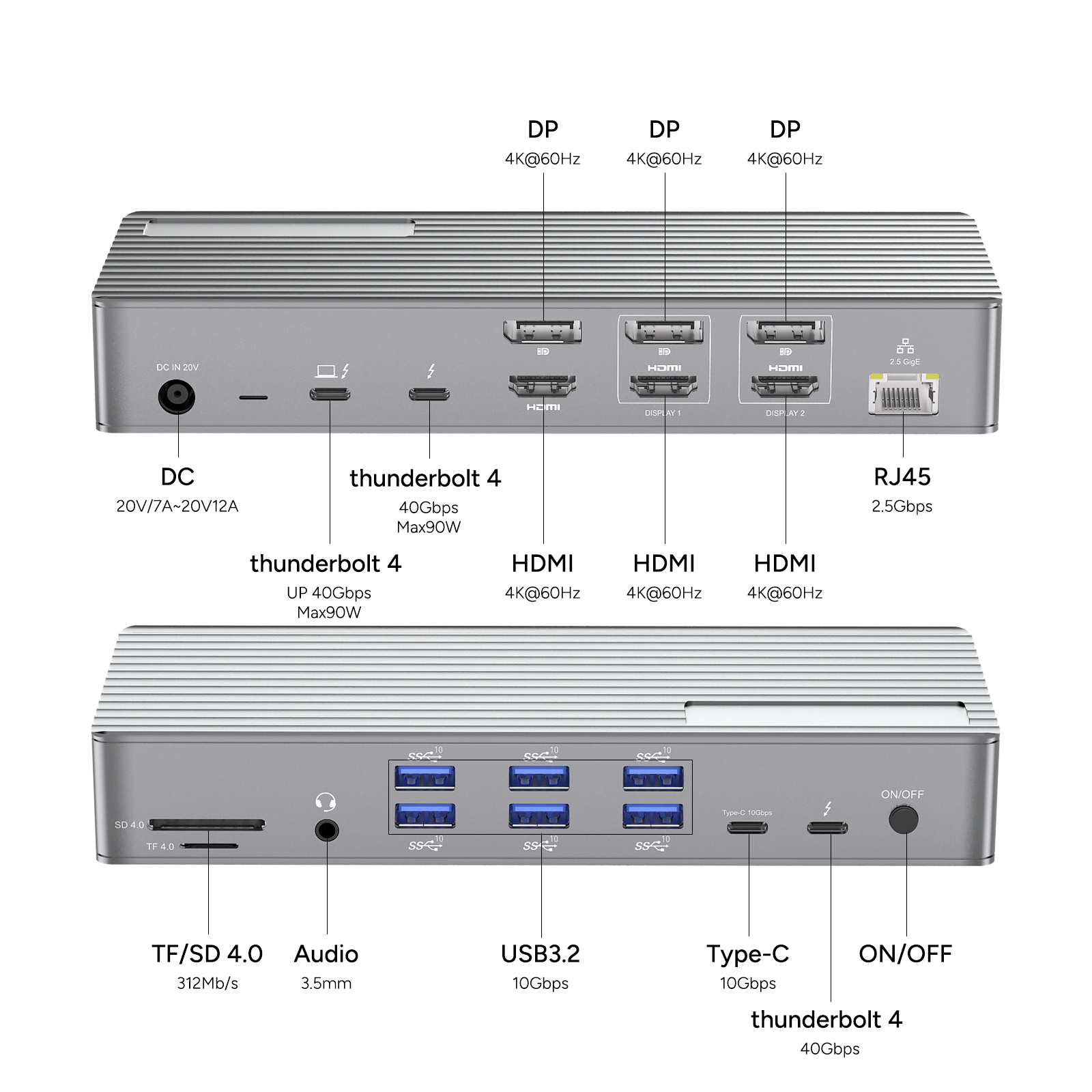
Thunderbolt 4 is a high-speed connection solution, especially suitable for crea-tive professionals. With its data transfer rate of up to 40 Gbps, support for 4K/8K displays, and 100-watt power supply capability, it greatly simplifies the crea-tive workflow. This integrated technology effectively reduces cable clutter and enhances the productivity of artists, designers, and content creators.
For video editors, photographers, and designers who need to transfer large-capacity files and high-definition media, Thunderbolt 4 provides the optimal bandwidth. This technology can simultaneously connect various high-speed peripheral devices, such as external hard drives, SSDs, high-resolution displays, audio interfaces, and docking stations. It not only accelerates data transfer speeds and improves workflow efficiency but also supports daisy-chaining devices, thereby greatly reducing cable clutter and creating an orderly workspace.
Scenarios Where Thunderbolt Is Essential
.Content Creators and Crea-tive Professionals
For users who work with high-resolution media, Thunderbolt supports advanced displays and fast 40 Gbps/32 Gbps PCIe data transfer, simplifying the crea-tive process.
.Gamers
Thunderbolt 4 offers PC gamers ultra-fast 40 Gbps data transfer, supports high-resolution displays up to 8K or dual 4K at 144Hz, and enables the simultaneous connection of multiple high-performance peripheral devices, ensuring a seamless and technologically advanced gaming experience.
.Businesses and Enterprises
Thunderbolt docking stations can serve as a central hub for connecting multiple peripheral devices, including external displays and storage devices, streamlining business workflows and improving work efficiency through high-speed data transfer.
Compatibility of Thunderbolt 4
Thunderbolt 4 has been designed with backward compatibility in mind, meaning it can seamlessly work with older Thunderbolt 3, USB4, and even USB 3.x devices and cables. This compatibility is achieved through the shared USB-C interface and the integration of Thunderbolt and USB protocols into the standards. As a result, users do not need to worry about compatibility issues when connecting different generations of devices, making it a convenient and versatile solution for various connection needs.
Devices That Use Thunderbolt
Since 2016, Apple has integrated Thunderbolt 3 into various MacBook Pro, MacBook Air, Mac Mini, and iPad Pro models. Starting in 2020, Apple began incorporating Thunderbolt 4 into its Apple Silicon-based Macs, such as the M1 MacBook Pro, MacBook Air, and Mac Mini, to provide enhanced connectivity and performance. Since its introduction, Thunderbolt 4 has become increasingly popular in Windows laptops, desktops, and Chromebooks. Numerous manufacturers, including Dell, HP, Lenovo, and Google, have adopted this technology and integrated it into a wide range of products, from ultrabooks and gaming laptops to high-performance workstations, providing users with enhanced connectivity and performance.
Is the Thunderbolt Dock Worth the Price?
Thunderbolt docking stations are a highly valuable investment, especially for crea-tive professionals, as they offer high-speed data transfer capabilities, simplified cable management, and easy connections to peripheral devices. For video editors, photographers, and designers who handle large files and high-resolution media, Thunderbolt docking stations can significantly reduce transfer times and improve work efficiency. Moreover, they are useful not only for gamers and business users but also indispensable tools for crea-tive professionals seeking efficient data transfer and simplified connections.